
RapidMES
BetaA Manufacturing Execution System for SMEs. Complete control over orders, items, and Bills of Process — the operational platform other RapidOps modules build on.
Sound familiar?
The problems RapidMES solves
Most SMEs run production on spreadsheets, paper, and informal updates. It works — until orders, items, and operations stop lining up.
Orders tracked in spreadsheets
Work orders managed across Excel sheets and emails. Easy to lose, hard to keep in sync, and impossible to see the real state of the shop.
With RapidMES: Every manufacturing order is created, scheduled, and tracked in one place, from release to completion.
Paper-based job control
Printed routings and travellers. Updates depend on someone walking the paperwork back to the office.
With RapidMES: Operators progress each order through its process steps on screen, and status updates as the work happens.
No real-time WIP visibility
Managers can't see where orders are without walking the floor. Bottlenecks are discovered after they've already cost throughput.
With RapidMES: Live status of every order and item on the floor, so bottlenecks show up while you can still act on them.
Fragmented operational data
Orders, items, and process data scattered across systems. No single source of truth tying them together.
With RapidMES: Orders, items, and operations are captured in a single source of truth, traceable by serial number.
How it works
From order to dispatch
RapidMES gives every order a clear path through your operations — and gives you visibility of every step along the way.
Define items & process
Set up item master data and Bills of Process. Configure routings, sequences, and resources for each product family — without hard-coded workflows.
- Item master data management
- Process routing definitions
- Operation sequencing and dependencies
- Resource and location requirements
- Process instruction documentation
Plan & release orders
Create manufacturing orders, prioritise the schedule, and release work to the floor when you're ready.
- Create and manage manufacturing orders
- Order scheduling and prioritisation
- Work order status visibility
Execute on the floor
Operators progress orders through process steps with built-in sequencing and interlocks. Status updates in real time.
- Step-level validation
- Process interlocking
- Configurable enforcement rules
- Item consumption and allocation
Trace & report
Every order and item has a complete history. Trace serial numbers, report on completion, and feed insights back into planning.
- Live order and item status
- Serial number traceability
- Item location tracking
- Bottleneck detection
- Operational dashboards
Included as standard
The Execution UI comes with RapidMES
Every RapidMES deployment includes the Execution UI — the shop-floor interface operators use to start orders, work through each process step, and record progress at their workstation. No extra module to buy.
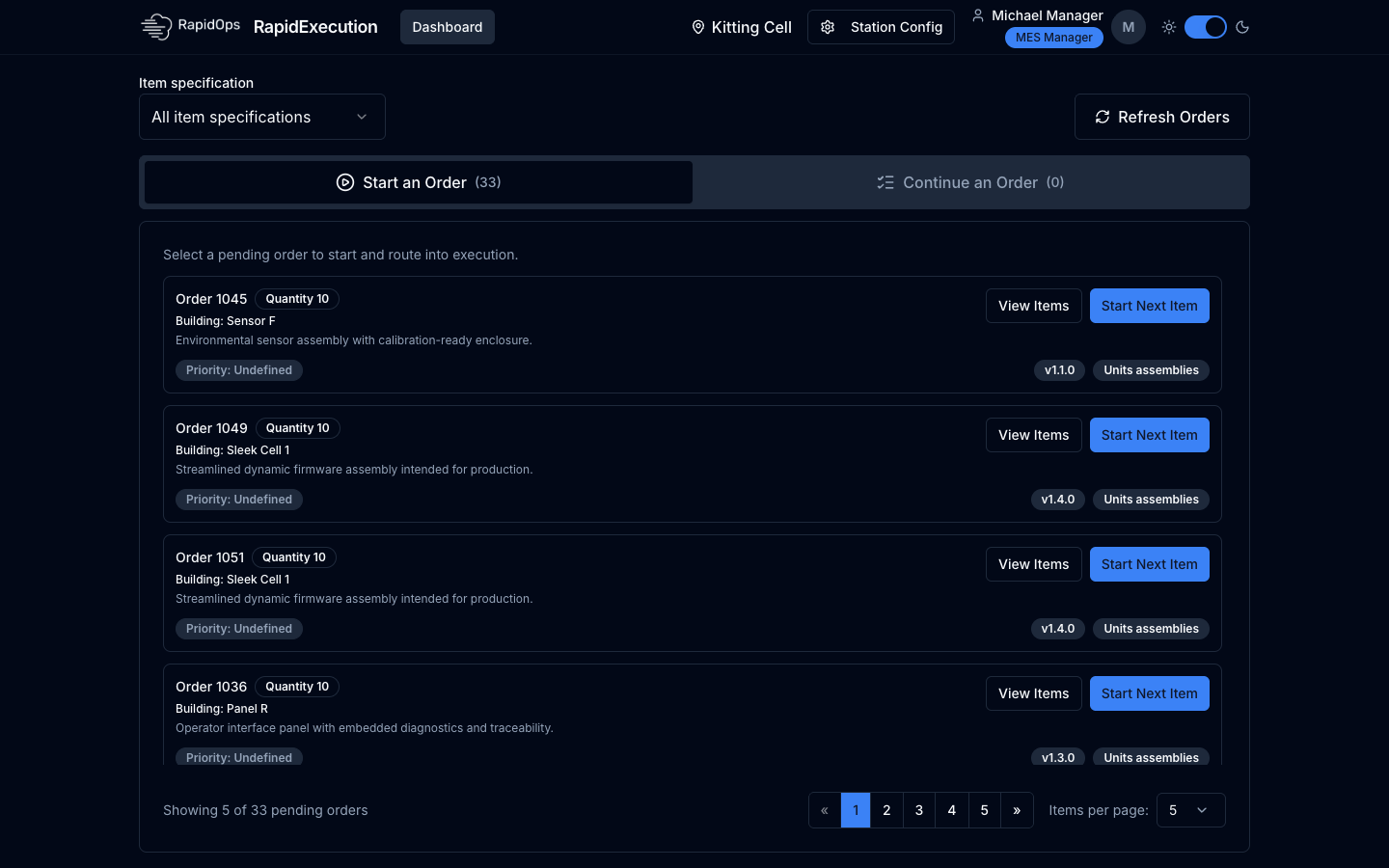
Station order list
Each workstation sees the orders waiting for it, ready to start or continue.
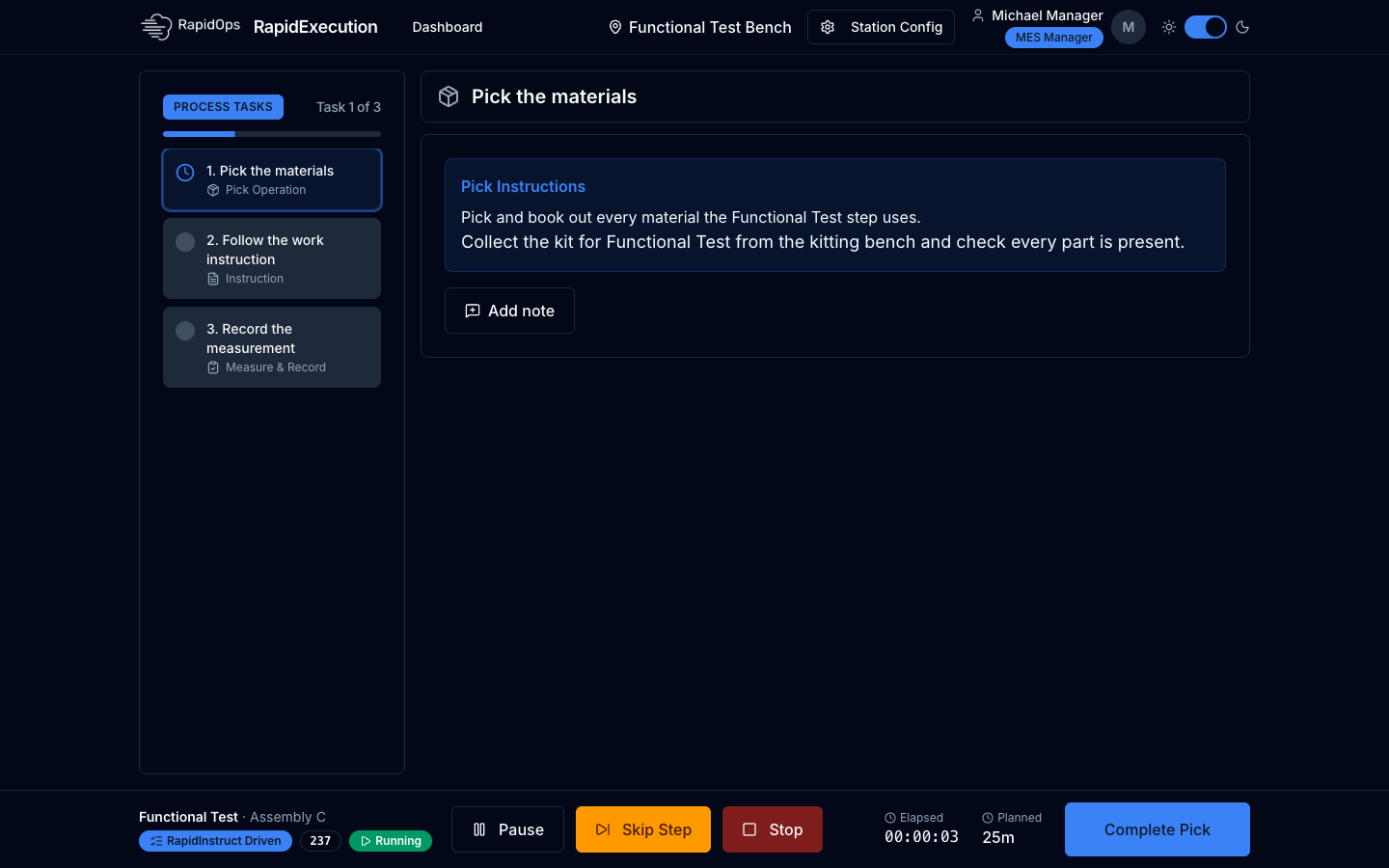
Operator step view
Operators work through each process step with clear instructions, timing, and one-tap completion.
How it fits
MES capability, without enterprise complexity
RapidMES sits between your ERP and the shop floor. It focuses on the operational execution layer — orders in progress, items being made, process steps being completed — and complements existing ERP, finance, and CRM systems via integrations.
It is also the foundation the other RapidOps modules build on. They all share the same orders, items, and traceability layer, so you can add them when you're ready.
View all modules“What has been ordered, and what does it cost?”
- Sales orders & customers
- Purchasing & finance
- Stays in place alongside RapidMES
“Where is every order right now, and what happens next?”
- Orders & items in progress
- Bills of Process & step sequencing
- Live WIP status
- Serial number traceability
FAQs
Common questions
Ready to transform your manufacturing execution?
Replace spreadsheets and paper with live control of orders, items, and Bills of Process. Book a demo to see RapidMES against your operation.